Dissolve Filter Component
Overview
This component applies a filter to the Unity UI component to create an effect of the component appearing/disappearing in a variety of effects based on the texture map and parameters used.
WebGL Demo
Properties
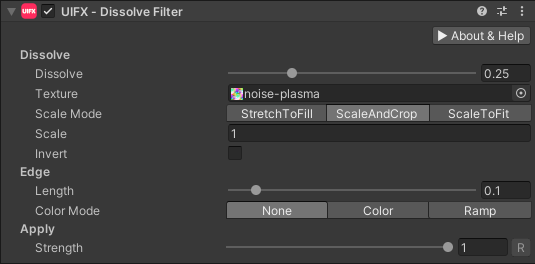
| Property | Type | Range | Default | Description |
|---|---|---|---|---|
| Dissolve | ||||
| Dissolve | Float | [0..1] | 0.25 | The amount to dissolve by. |
| Texture | Texture | The texture that controls the pixel dissolve order. RGB channel is used. Darker pixels are dissolved first. | ||
| Scale Mode | Enum | ScaleAndCrop | How the texture is scaled to the Graphic this effect is being applied to. Options are:• StretchToFill: Texture is stretched and doesn't maintain it's aspect ratio, but it does fill the entire Graphic.• ScaleAndCrop: The texture maintains aspect ratio, but part of it may be cropped to fill the entire Graphic. (DEFAULT)• ScaleToFit: The texture maintains aspect ratio, but it will not fill the entire Graphic unless it's Wrap Mode is set to Repeat/Mirror. | |
| Scale | Float | [-∞..∞] | 1.0 | An additional scale value to increase/decrease the scale of the texture |
| Invert | Bool | False | Inverts the texture dissolve pixel order to use brightest pixels first. | |
| Edge | ||||
| Length | Float | [0..1] | 0.1 | The length of the edge used to fade the dissolve effect or add a color/texture ramp. |
| Color Mode | Enum | None | How the edge length is filled. Options are: • None: The edge is faded to transparency. (DEFAULT)• Color: The edge is tinted a fixed color.• Ramp: A horizontal gradient texture is used to fill the edge. | |
| Color | Color | Black | The color to fill the edge with. | |
| Ramp | Texture | White | The horizontal gradient texture to fill the edge with. | |
| Emissive | Float | [0..10] | 0.0 | Values above zero will increase the brightness of the edge color/texture allowing the edge to glow when using a Bloom filter. |
| Apply | ||||
| Strength | Float | [0..1] | 1.0 | Strength of the effect. |
Usage
Add this component to any GameObject that contains a UI Graphic component (eg Text, Image, RawImage, etc).
Usage with TextMeshPro
To use this filter effect with TextMeshPro use the Filter Stack (TextMeshPro) component.